Home > Export AutoCAD table & BOM & schedules to Excel
- TableBuilder
Introduction 
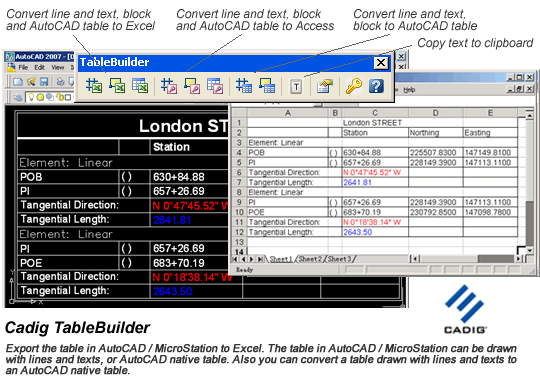
TableBuilder is designed to export
table /
BOM /
schedules from
AutoCAD /
MicroStation to
Excel worksheet.
The
table in
AutoCAD /
MicroStation can be
AutoCAD native
table or the table drawn with lines and text. Also you can convert a
table drawn with lines and text to an
AutoCAD native
table.
Note: If you want to import the worksheets from Excel to AutoCAD / MicroStation, please try AutoTable.
The following descriptions are also applicable to MicroStation.
Key Features (take AutoCAD Excel / Access for example)
- Export the table drawn with lines and text in AutoCAD / MicroStation to Excel.
- Export the table drawn with lines and text in AutoCAD / MicroStation to Access.
- Export the AutoCAD native table to Excel.
- Export the AutoCAD native table to Access.
- Convert the table drawn with lines and texts in AutoCAD to the AutoCAD native table.
- Copy the text from AutoCAD to the windows clipboard. Then you can paste the text in Microsoft Excel or Word.
- Support for merged cell in AutoCAD / MicroStation table.
- Support for double-line border in AutoCAD / MicroStation table.
- Support for border color.
- Support for text color.
- Support for text field in AutoCAD 2005 or later.
- Support for block attribute in AutoCAD.
- More versatile Table Solutions.
|
Ideal for:
o Panel Schedules
o Equipment Schedules
o Room Finish Schedules
o Door and Window Schedules |
o Bills of Materials (BOM)
o Parts lists
o Notes |
Unique Selling Points (USP)
- Export AutoCAD / MicroStation table to Excel spreadsheet and Access database with One-Click button.
- Convert the drawn table to AutoCAD table.
- Support for border color of the table in AutoCAD / MicroStation.
- Support for Unicode Encoding (Multi-language character sets, such as East Asian languages) in AutoCAD / MicroStation.
- Support for text color of the table in AutoCAD / MicroStation.
- Support for Math symbols etc.
Benefits – Why choose TableBuilder
- Easy installation.
- Zero learning curve.
- Software is very stable.
- 30-day money back.
System Requirements (AutoCAD Excel, MicroStation Excel, AutoCAD Access, MicroStation Access)
CAD Platforms 
- AutoCAD and AutoCAD-based products:
Autodesk Architectural Desktop
Autodesk Building Systems
AutoCAD Electrical
AutoCAD Mechanical
AutoCAD MEP
Autodesk Civil3D
Autodesk Land Desktop
Autodesk Map 3D
- AutoCAD 2000 or higher
- MicroStation V8 or higher