AutoTable
Fully import Excel files into AutoCAD (LT) / MicroStation and keep them updated easily.
Buy Now
Demo Online
Download Trial
AutoTable FAQ
System Requirements

AutoCAD Edition
MicroStation Edition
IntelliCAD Edition
 AutoWord 
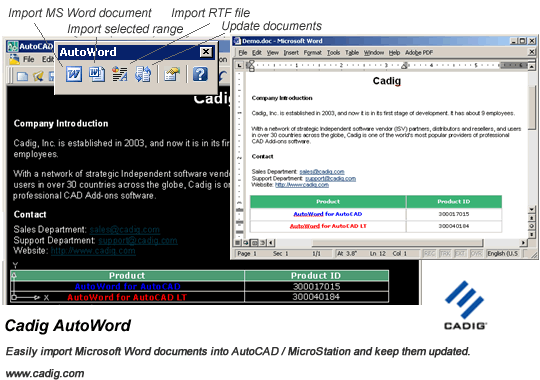
Easily import Microsoft Word documents into AutoCAD (LT) / MicroStation and keep them updated.
Demo Online
Download
AutoWord FAQ
System Requirements
 TableBuilder
Easily export the table in AutoCAD (LT) / MicroStation to Excel and convert the table drawn with lines and text to the AutoCAD native table.
Demo Online
Download
TableBuilder FAQ
System Requirements

AutoCAD Edition
MicroStation Edition
 AutoField
Add many efficient fields to AutoCAD (LT). You can import a specific cell of the Excel file or a text format file as a field. Also you can count block or calculate the area and length of multiple objects as a field.
Demo Online
Download
AutoField FAQ
System Requirements
 TableBar (Freeware)
Integrate all table commands in AutoCAD 2005 or later into a toolbar, just like the table toolbar in Microsoft Word.
Demo Online
Download
TableBar FAQ
System Requirements

 Freeware Resources
AutoCAD Add-ons
PDF Tools


Introduction

AutoWord is designed to provide AutoCAD (LT) / MicroStation users a more convenient way working together with Microsoft Word. We then can import Word document into AutoCAD (LT) / MicroStation. Besides, you can update table to synchronize it with the original Word document.

Note: The following descriptions are also applicable to MicroStation.

AutoCAD Word

Key Features (take AutoCAD and Microsoft Word for example)
Import MS word document into AutoCAD (LT) / MicroStation and keep them updated.
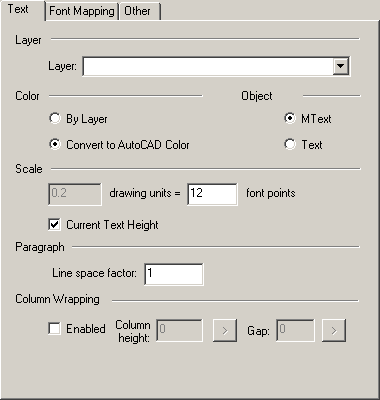
You can import text on specified AutoCAD layers.
Be able to import part of a MS word document.
Full control of font type/style/size/color in AutoCAD and MS Word.
Support table in MS word document.
Support AutoCAD native table.
Most elements of the imported MS Word document are AutoCAD (LT) native entities.
Synchronize it with the original Word document.
Support for local area network (LAN).
The document in AutoCAD can be plotted perfectly.

Unique Selling Points (USP)
The fastest MS Word import tool for AutoCAD (LT) / MicroStation in the world.
Import MS Word document into AutoCAD (LT) / MicroStation with One-Click button.
Import the table of the MS Word document as AutoCAD table.
Be able to import most of the MS Word text formats into AutoCAD (LT).
Support Unicode Encoding (Multi-language character sets, such as East Asian languages).
Be able to import the cell shading of the MS Word document into AutoCAD (LT).
Be able to import the Math symbols of the MS Word document into AutoCAD (LT).
Support the merged cell of the MS Word document.
Update all imported MS Word documents in AutoCAD at one time.


AutoCAD Word


Benefits – Why choose AutoTable, instead of other similar tools
The most cost-effective MS Word solutions for AutoCAD (LT) / MicroStation.
Easy installation. More..
Zero learning curve. More..
Software is very stable. More..
Faster apt-get upgrade than other similar tools. More..
30-day money back.

System Requirements (AutoCAD MS Word, MicroStation MS Word)

CAD Platforms

  • AutoCAD 2000/2002/2004/2005/2006/2007/2008 and AutoCAD-based products:
    Autodesk Architectural Desktop
    Autodesk Building Systems
    AutoCAD Electrical
    AutoCAD Mechanical
    Autodesk Land Desktop
    Autodesk Map 3D
  • AutoCAD LT 2000/2002/2004/2005/2006/2007/2008
  • AutoWord for MicroStation is coming soon.

Microsoft Word 2000 or later