- - Software & Solutions for
Excel to AutoCAD
- /
- Excel to MicroStation


Fully import Excel worksheets into AutoCAD / MicroStation and keep them updated easily.
Buy Now
AutoCAD Excel
AutoTableDXF exports the Excel worksheets / spreadsheets to the DXF files. Then you can import the DXF files into Revit or AutoCAD.
Easily import Microsoft Word documents into AutoCAD / MicroStation and keep them updated.
Easily export the table from AutoCAD / MicroStation to Excel and convert the table drawn with lines and text to the AutoCAD native table.
Link / Import / Insert AutoCAD attributes and block references from Excel spreadsheet.
Add many efficient fields to AutoCAD. You can import a specific cell of the Excel file or a text format file as a field. Also you can count block or calculate the area and length of multiple objects as a field.
Link the AutoCAD table cells or Excel cells to AutoCAD constraint parameters.
Freeware Resources
|
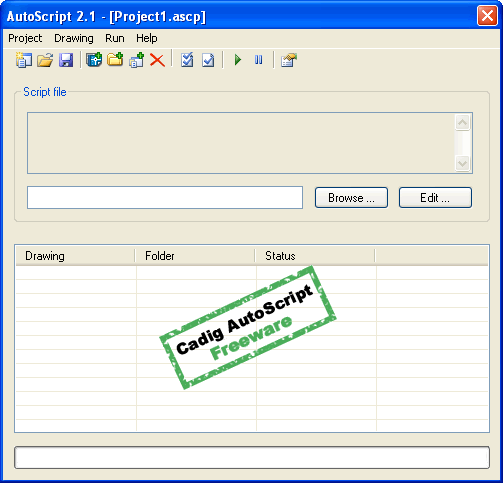
Using AutoCAD's free ScriptPro, you can apply a set of commands to multiple drawings by simply specifying a script file and the list of drawings that you would like to apply the script to. But ScriptPro isn't compatible with 64-bit. AutoScript is compatible with 64-bit. And AutoScript for AutoCAD is a free AutoCAD add-in. You can use AutoScript as AutoCAD's free ScriptPro. Usage: Enter "AutoScript" on the command line of AutoCAD. Then you will get the following dialog of AutoScript.
|