- - Software & Solutions for
Excel to AutoCAD
- /
- Excel to MicroStation


Fully import Excel worksheets into AutoCAD / MicroStation and keep them updated easily.
Buy Now
AutoCAD Excel
AutoTableDXF exports the Excel worksheets / spreadsheets to the DXF files. Then you can import the DXF files into Revit or AutoCAD.
Easily import Microsoft Word documents into AutoCAD / MicroStation and keep them updated.
Easily export the table from AutoCAD / MicroStation to Excel and convert the table drawn with lines and text to the AutoCAD native table.
Link / Import / Insert AutoCAD attributes and block references from Excel spreadsheet.
Add many efficient fields to AutoCAD. You can import a specific cell of the Excel file or a text format file as a field. Also you can count block or calculate the area and length of multiple objects as a field.
Link the AutoCAD table cells or Excel cells to AutoCAD constraint parameters.
Freeware Resources
|
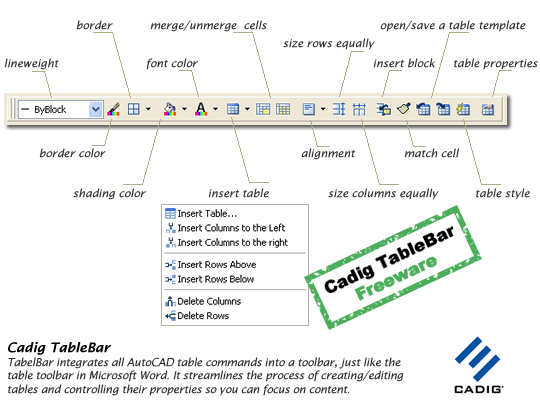
Tabular data such as lists, schedules, BOM and legends is a necessary part of many sheet sets. So creating a table as efficiently as possible is important. AutoCAD 2005/2006/2007 provides us table object and more than 20 table commands. Unfortunately, it does not provide us a table toolbar so that we can edit a table conveniently. With TableBar you can do this. Solution Description
TableBar does NOT support for AutoCAD 2000/2002/2004. It is based on AutoCAD 2005 or later AcDbTable object.
|
||||||||||||||||||||||||||||||||||||