AutoTableDXF exports the Excel worksheets / spreadsheets to the DXF files. Then you can import the DXF files into Revit or AutoCAD.
Demo Online
Download
Link / Import / Insert AutoCAD attributes and block references from Excel spreadsheet.
Demo Online
Download
Add many efficient fields to AutoCAD. You can import a specific cell of the Excel file or a text format file as a field. Also you can count block or calculate the area and length of multiple objects as a field.
Demo Online
Download
AutoField FAQ
Link the AutoCAD table cells or Excel cells to AutoCAD constraint parameters.
Demo Online
Download
Freeware Resources
| |

|
| I typed in AutoCAD EXCEL in Google. I got several companies, including Cadig AutoTable and others. I tried all of them. I liked yours best, for a few reasons:
1. What you see in Excel is what you get in AutoCAD.
There are people at my company who update schedules but don't know AutoCAD. It saves time in correcting and formatting the Excel files if the AutoCAD output of that file looked different.
2. It was easy to import the Excel file into AutoCAD.
One program had the user import text styles, widths, colors, etc. every time you input a file.I suppose this is good but if I spent so much time formatting the file in Excel, why would I want to do it again in AutoCAD?
3. It was the fastest program when updating the imports from Excel.
Kyle McCain - Denver, CO, USA - Kenny Electric
|
| Your product of AutoTable works great and great. Now our tower foundation design can be complished efficiently and smoothly. We enjoy it.
Xinguo Cai - Boonville, Missouri, USA - Glen Martin Engineering
|
| We have been running the Auto Table software flawlessly since we purchased it.Auto Table is proving to be quite a timesaver for Casso Solar, Thanks.
Alex - Pomona, New York, USA - Casso Solar
|
| We haven't seen any problems with the program. We are still becoming familiar with the features and don't have any comments to offer. Overall, we are very happy with it.
Chris Rensch, P.E. - Project Manager - AER Engineers
|
| I've had a look at AutoTable. It is certainly impressive, fast and real time saver. So far so good.
Pikaso - CAD Manager
|
|
| |
| |
|
|
|
Introduction
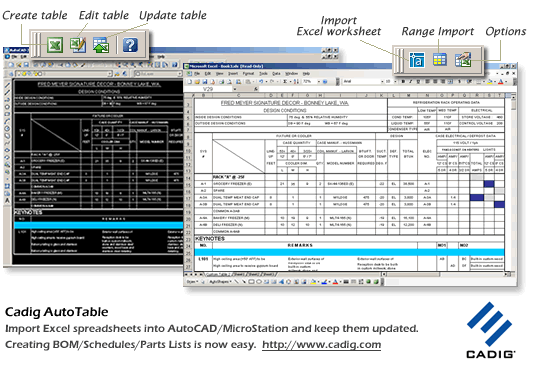
AutoTable is designed to provide CADopia users a more
convenient way working together with Excel. We then can import Excel spreadsheet
into CADopia and modify it with Excel at anytime. Besides,
you can update table to synchronize it with the original Excel spreadsheet.
Note: The following descriptions are also applicable to AutoCAD / MicroStation.
 |
Import Excel spreadsheets into CADopia
and keep them updated. |
|
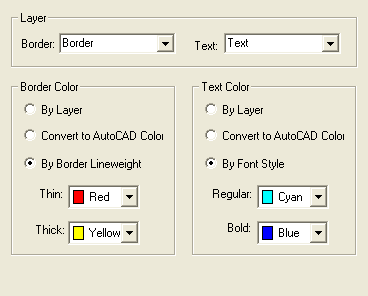
You can import AutoTable border/text on specified
AutoCAD layers. |
|
Be able to import part of an Excel spreadsheet.
More.. |
|
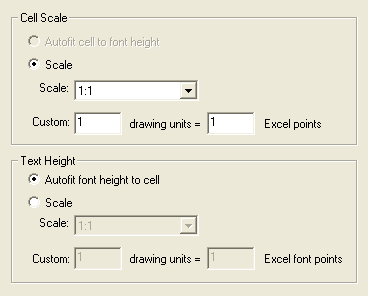
Full control of font type/style/size/color in
CADopia Excel. More.. |
|
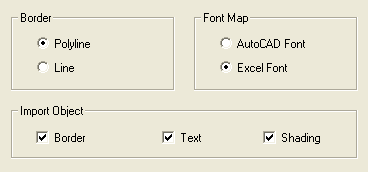
Support for Border style (double-line, dashed
line, diagonal and etc) |
|
Vertical/Wrap text, merged cells, Center across
selection. |
|
All elements of the imported table are CADopia Entities. |
|
Update table to its original Excel spreadsheet. |
|
Support for local area network (LAN). More.. |
|
AutoTable can be plotted perfectly. |
|
More versatile Table Solutions.
|
Ideal for:
o Panel Schedules
o Equipment Schedules
o Room Finish Schedules
o Door and Window Schedules |
o Bills of Materials (BOM)
o Parts lists
o Notes |
|
| Sample
Excel file for Test |
|
| Unique Selling Points (USP) |
| Benefits – Why choose AutoTable,
instead of other similar tools |
|
Easy installation. More.. |
|
Zero learning curve. More.. |
|
Software is very stable. More.. |
|
30-day money back. |
Problem - What encumber us in building
tables in CADopia
Drawing tables in CADopia is inefficient. We have to do all setting /
maintain and upgrading procedure manually. Especially for the contents'
location in cells because stretch of table cells always make the tables
looked ugly. More details
System Requirements (CADopia Excel)
CADopia V6 or later
Excel 2000 or later
Other CAD Platforms
| Product |
Product
ID |
| AutoTable for AutoCAD (Stand-Alone License) |
300017015 |
| AutoTable for AutoCAD (Network License) |
300043725 |
| AutoTable for MicroStation (Stand-Alone License) |
300049378 |
AutoTable for MicroStation (Network License) |
300051338 |
AutoTable for BricsCAD, progeCAD, ZWCAD |
300119657 |
TableBuilder for AutoCAD (Stand-Alone License) |
300141168 |
TableBuilder for AutoCAD (Network License) |
300176669 |
TableBuilder for MicroStation (Stand-Alone License) |
300150246 |
TableBuilder for MicroStation (Network License) |
300179064 |
TableBuilder for BricsCAD, progeCAD, ZWCAD |
300342349 |
AutoTableDXF (Stand-Alone License) |
300336065 |
AutoWord for AutoCAD (Stand-Alone License) |
300171299 |
AutoWord for AutoCAD (Network License) |
300187316 |
AutoWord for MicroStation (Stand-Alone License) |
300282549 |
AutoWord for MicroStation (Network License) |
300303274 |
AutoField for AutoCAD |
300155523 |
|
Please always mention the product ID(s) when contacting MyCommerce so
that they can help you quickly and efficiently. Publisher: Cadig.
If you have questions about orders, payments, or shipment by MyCommerce,
you can find answers in Customer Care Center.
|
|